
HP FlexFabric 11900 Switch Series Installation Guide



17
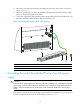
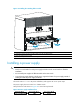
2. Remove the grounding screws from the grounding holes at the rear of the chassis, as shown in
callout 1 on Figure 13.
3. Fasten the gr
ounding screws, which are attached with the dual-hole terminals of the grounding
cable, into the grounding holes of the chassis.
4. Connect the ring terminal of the grounding cable to the grounding post of the grounding strip, and
fasten the grounding cable to the grounding strip with the hex nut.
Figure 13 Connecting the grounding cable to a grounding strip
(1) Groundin
g
si
g
n
(2) Attach the
g
roundin
g
screws with dual-hole terminals to the
g
roundin
g
holes
(3) Groundin
g
strip
(4) Groundin
g
post
(5) Rin
g
terminal
(6) Hex nut
Grounding the switch through the PE wire of an AC power
supply
CAUTION:
Make sure the AC power supply uses a three-wire cable with a protection wire, and the PE wire of the AC
power supply is well grounded at the power distribution room or AC power supply transformer side. In
addition, make sure the PE connector on the switch is well connected to the PE wire of the AC power
supply.
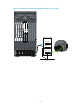
If the switch is AC powered and no grounding strip is available at the installation site, you can ground
the switch through the PE wire of the AC power supply, as shown in Figure 14.