
HP FlexFabric 11900 Switch Series Installation Guide



22
Installing an MPU/LPU
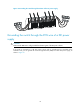
The pink edged MPU slots and purple edged LPU slots of a 11908-V switch are located at the front panel.
The MPUs and LPUs are vertically oriented. When installing an MPU or LPU, make sure its PCB faces left.
To install an MPU or LPU:
1. Wear an ESD wrist strap, and make sure it makes good skin contact and is well grounded. For
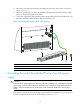
more information, see "Attaching an ESD wrist strap."
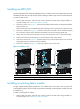
2. As shown in
callout 1 on Figure 17, rem
ove the blank filler panel from the slot. Keep the blank filler
panel for future use.
Some card slots do not have a blank filler panel. The figures in this section are for illustration only.
3. As shown in callout 2 on Figure 17, hold the c
ard by the front panel with one hand and support
the card bottom with the other. Slide the card steadily into the slot along the guide rails.
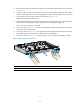
4. When most part of the card is inserted in the slot, press the ejector levers on the card outward.
5. Push the card until the positioning pin on card touches the hole on the chassis.
6. As shown in callout 3 on Figure 17, pres
s the ejector levers inward until the ejector levers touch the
panel tightly and the card seats into the backplane
7. As shown in callout 4 on Figure 17, fasten the c
aptive screws on the card.
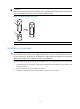
Figure 17 Installing a card
(1) Loosen the captive screws (2) Insert
the card into the slot
(3) Press the ejector levers inward (4) Fasten the captive screws
Installing a switching fabric module
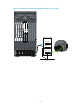
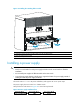
The gray edged switching fabric module slots of a 11908-V switch are located at the rear panel. The
switching fabric modules are horizontally oriented. When installing a switching fabric module, make sure
its PCB faces up.
To install a switching fabric module:
1. Wear an ESD wrist strap, and make sure it makes good skin contact and is well grounded. For
more information, see "Attaching an ESD wrist strap."