
HP FlexFabric 11900 Switch Series Installation Guide



23
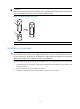
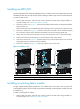
2. Remove the filler panel (if any) from the target slot. Keep the filler panel for future use. See callout
1 on Figure 17.
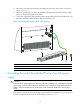
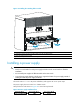
3. Loo
sen the captive screws on the protection box on the switching fabric module for the 11908-V
switch, hold the ejector levers on the switching fabric module, pressing the buttons on the levers,
pull the ejector levers outward, and pull out the module. See Figure 18.
Keep the prot
ection box for future use.
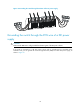
4. Hold the switching fabric module by the front panel with one hand and support its bottom with the
other. Slide the switching fabric module steadily into the slot along the guide rails.
Do not touch the components on the PCB.
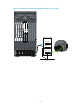
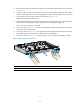
5. As shown in callout 1 in Figure 19, push t
he switching fabric module until the brakes on the ejector
levers touch the slot edges tightly.
6. As shown in callout 2 in Figure 19, press t
he ejector levers inward until the ejector levers touch the
panel tightly and the switching fabric module seats into the backplane.
7. As shown in callout 3 in Figure 19, fasten
the captive screws on the switching fabric module.
Figure 18 Removing the protection box
(1) Loosen the captive screws (2)
Press
down
the buttons
(3) Pull the ejector levers outward (4) Pull out the switchin
g
fabric module