
HP FlexFabric 11900 Switch Series Installation Guide



24
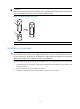
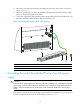
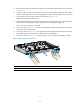
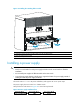
Figure 19 Installing the switching fabric module
(1) Insert the card into the slot until the brakes touch the slot edges tightly
(2) Press the ejector levers inward
(3) Fasten the captive screws on the switchin
g
fabric module
Installing a power supply
CAUTION:
• Provide a circuit breaker for each power supply and make sure the circuit breaker is off before
installation.
• Do not install power supplies of different models on the same switch.
• To avoid power supply damage or bodily injury, support the bottom of a power supply instead of
holding its handle for power supply movement.
The switch uses N + 1 or N + N power redundancy and supports AC or DC power input.
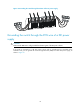
The power supply slots are vertical on a 11908-V switch.
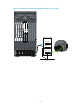
Strictly follow the order shown in Figure 20 to a
void security hazards.
Figure 20 Power supply installation flow