
HP FlexFabric 11900 Switch Series Installation Guide

29
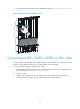
4. Connect the fiber to the module. For the installation procedure, "Connecting your switch to the
network."
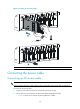
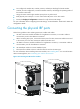
Figure 24 Installing an SFP+/SFP/QSF
P+ module
Connecting an SFP+/QSFP+/QSFP+ to SFP+ cable
Use SFP+ cables to connect SFP+ ports, QSFP+ cables to connect QSFP+ ports, and QSFP+ to SFP+
cables to connect QSFP+ and SFP+ ports. All these cables are hot swappable.
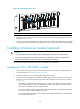
To connect an SFP+, QSFP+, or QSFP+ to SFP+ cable:
1. Wear an ESD wrist strap and make sure it makes good skin contact and is well grounded. For
more information, see "Attaching an ESD wrist strap."
2. Unpac
k the cable.
3. Plug the cable connector into the port. Make sure the cable connector is the right side up.
The bend radius of the cable must be at least eight times the cable diameter.