
HP FlexFabric 11900 Switch Series Installation Guide

33
• First configure the member IDs, member priorities, and IRF port bindings for the IRF member
switches, save the configuration, connect the member switches, and change the operating mode of
the switches to IRF mode.
• Assign the master switch higher member priority than any other switch.
• Bind physical ports to IRF-port 1 on one switch and to IRF-port 2 on the other switch.
• Execute the display irf configuration command to verify the basic IRF settings.
For more information about configuring basic IRF settings, see HP FlexFabric 11900 Switch Series IRF
Configuration Guide.
Connecting the physical IRF ports
Follow these guidelines when selecting transceiver modules and cables:
• Use SFP+ transceiver modules and fibers for long-distance connection, or use SFP+ cables to
connect SFP+ ports for short-distance connection.
• When connecting SFP+ ports, connect the transmit port of an SFP+ transceiver module at one end
to the receive port of an SFP+ transceiver module at the other end.
• Use QSFP+ transceiver modules and fibers for long-distance connection, or use QSFP+ cables to
connect QSFP+ ports for short-distance connection.
• Use twisted-pair cables to connect 10Gbase-T ports.
• The transceiver modules at the two ends of an IRF link must be the same type.
For more information about installing transceiver modules, see "Installing FRUs." F
or more information
about connecting fibers, see "Connecting your switch to the network."
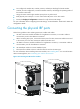
Figure 26 Connecting two IRF member switches