
HP FlexFabric 11900 Switch Series Installation Guide


39
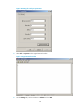
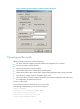
Figure 32 Setting terminal emulation in Switch Properties dialog box
Powering on the switch
Before powering on the switch, confirm the following:
• You know where the emergency power-off switch for the equipment room is located.
• The switch has been securely mounted.
• All the cards have been correctly installed.
• The unused slots have been installed with blank filler panels.
• All the network cables, fibers, power cables, and grounding cables have been correctly connected.
• The input power voltage meets the requirement of the switch.
• The console cable is correctly connected, the terminal or PC used for configuration has started, and
the configuration parameters have been set.
To power on the switch:
Turn on the power source of the switch to power on the switch.
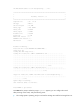
The following is sample output you can see on the terminal:
System is starting...
Press Ctrl+D to access BASIC-BOOTWARE MENU...
Press Ctrl+T to start memory test
Press Ctrl+V to start heavy memory test
Booting Normal Extended BootWare....