
HP FlexFabric 11900 Switch Series Installation Guide



51
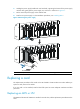
6. Holding the power supply handle with one hand and, supporting the bottom of the power supply
with the other, gently pull the power supply out, as shown in callout 2 on Figure 37.
7. Put the rem
oved power supply on the antistatic mat.
8. Install a new power supply. For the installation procedures, see "Installing FRUs."
Figure 37 Removing the power suppl
y
(1) Loosen the captive screw (2) Pull the power supply out
Replacing a card
The replacement procedures of the cards on the HP FlexFabric 11900 switches are similar. Before you
replace a card, remove all its cables.
If no new card is to be installed, install a blank filler panel to ensure adequate ventilation and dust
prevention.
Replacing an MPU or LPU
The MPUs and the LPUs of 11908-V are installed in vertical slots, and the replacement procedures are the
same.
1
2