
HP FlexFabric 11900 Switch Series Installation Guide



54
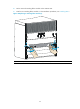
Figure 40 Replacing a switching fabric module (2)
Replacing a fan tray
CAUTION:
To avoid bodily injury, do not touch the rotating fans when replacing the fan tray.
When the fan tray fails, replace the fan tray to ensure normal operation of the switch.
The fan tray slot is horizontally oriented for the 11908-V switch. This section describes removing and
installing a fan tray on a 11908 -V.
Removing a fan tray
CAUTION:
To ensure normal ventilation, install a new fan tray within two minutes after removing the old one.
To remove a fan tray:
1. Prepare an antistatic mat to place the fan tray to be removed.
2. Put on an ESD wrist strap and make sure the wrist strap makes good skin contact and is well
grounded. For more information, see "Installing FRUs."
3. Loosen the captive screws on the fan tray, as shown in callout 1 on Figure 41.