
HP FlexFabric 11900 Switch Series Installation Guide

55
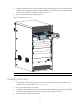
4. Hold the handle of the fan tray with one hand to gently pull the fan tray part way out of the chassis.
After the fans stop rotating, support the bottom of the fan tray with the other hand, and take out the
fan tray from the chassis, as shown in callout 2 on Figure 41.
5. Put the rem
oved fan tray on the antistatic mat.
Figure 41 Removing a fan tray
(1) Loosen the captive screws on the fan tray. (2) Take the fan tray out of the chassis.
Installing a fan tray
1. Wear an ESD wrist strap and make sure the wrist strap makes good skin contact and is well
grounded. For more information, see "Installing FRUs."
2. Take out the fan tray from its package.
3. Holding the handle of the fan tray with one hand and supporting bottom with the other, gently slide
the fan tray along the guide rails into the slot until it is firmly secured in the slot.
4. Fasten the captive screws on the fan tray.
1
1
2