
HP FlexFabric 11900 Switch Series Installation Guide
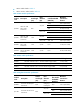
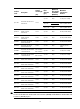
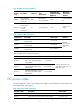

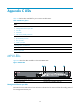

68
is greater than the system power consumption. HP recommends that you reserve 20% of the maximum
output power.
IMPORTANT:
• Power supplies of different models cannot be installed on the same switch.
• When the temperature of a power supply exceeds the normal operatin
g
temperature, the power suppl
y
is automatically powered off. When the temperature recovers to the normal temperature, the power
supply is automatically powered on.
Fan trays
Table 26 shows the fan tray that a 11908-V switch chassis supports. Every 11908-V switch comes with one
fan tray installed.
Table 26 Fan tray specifications
Product code HP description Alias
Number
of fans
Fan
diameter
Maximum
rotating
s
p
eed
Maximum
air flow
rate
JG618A
HP FlexFabric
11908-V Spare
Fan Assembly
11908-V fan
tray
12
120 mm
(4.72 in)
5200 RPM 1152 CFM
Mounting accessories
Before installing the switch to the rack, install slide rails to the rack. You can order an HP X421 A-Series
Chassis Universal 4-Post Rack Mounting Kit (JC665A), which is referred to as "the rack mounting kit" in
this document.
An HP X421 A-Series Chassis Universal 4-Post Rack Mounting Kit (JC665A) includes cage nuts, screws,
and a pair of slide rails. The length of the slide rails is in the range of 500 mm (19.69 in) to 800 mm
(31.50 in). A pair of slide rails can bear a maximum weight of 350 kg (771.60 lb). Before you use the
slide rails, make sure the following requirements are satisfied:
• The inside depth of the rack falls into the length range of the slide rail.
• The slide rails can support the total weight of the switch chassis and its accessories.
Transceiver modules
The switch supports transceiver modules. You can order transceiver modules according to the transceiver
modules supported by the LPU interfaces. For more information, see Table 21.
T
he switch supports the following transceiver modules:
• 10-Gigabit SFP+ modules in Table 27
• 1
0-Gigabit SFP+ cables in Table 28
• Gig
abit SFP modules in Table 29
• QSFP+ modul
es listed in Table 30