
HP FlexFabric 11900 Switch Series Installation Guide


74
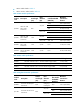
Table 35 Management Ethernet port LED description
LIN
K
ACT Descri
p
tion
On Flashing
A link is present, and the management Ethernet port is receiving or
sending data.
On Off A link is present.
Off Off No link is present.
Fan LEDs
Each MPU provides two sets of LEDs (OK and FAIL) to indicate the status of two fan trays (FAN0 and
FAN1).
The 11908-V switch has only one fan tray. The LED for the fan tray is the FAN0 LED on the MPU.
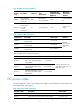
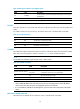
Table 36 Fan LED description
O
K
FAIL Descri
p
tion
On Off The fan tray is operating correctly.
Off On A fan problem is present or the fan tray is not in position.
Off Off The switch is not powered on.
Card LEDs
Each MPU has the LEDs numbered the same as card slots to indicate the status of the active MPU, standby
MPU, LPUs, and switching fabric modules in the slots. Table 37 sh
ows the LED description.
NOTE:
Slot numbers are marked on top of the slots on the 11908-V switch.
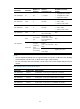
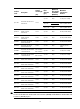
Table 37 Card LED description
RUN ALM Descri
p
tion
Flashes once per second Off The card is operating correctly.
Flashes once per second
Flashes once every
4 seconds
The card temperature exceeds the upper warning threshold
or falls below the lower warning threshold.
On On The card is booting or faulty.
Off Off The card is not in position.
NOTE:
• When a RUN LED flashes four times every second, the card is loading software. If the LED flashes
continuously in this state, the card is not compatible with the switch software..
• It is normal that the ALM LED for an LPU lights for a period of time at the initial phase of the system
startup.
MPU active/standby status LED
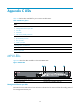
Each MPU has one ACTIVE LED to indicate the active or standby status of the MPU.