
R211x-HP Flexfabric 11900 ACL and QoS Command Reference
96
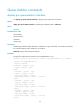
Queue statistics commands
display qos queue-statistics interface
Use display qos queue-statistics interface to display queue statistics for an interface.
Syntax
display qos queue-statistics interface [ interface-type interface-number ] outbound
Views
Any view
Predefined user roles
network-admin
network-operator
mdc-admin
mdc-operator
Parameters
interface-type interface-number: Specifies an interface by its type and number. If no interface is specified,
the command displays queue statistics for all interfaces.
outbound: Displays outbound queue statistics.
Examples
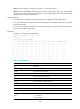
# Display the outbound queue statistics for Ten-GigabitEthernet 1/0/1.
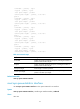
<Sysname> display qos queue-statistics interface Ten-GigabitEthernet 1/0/1 outbound
Interface: Ten-GigabitEthernet1/0/1
Direction: outbound
Forwarded: 0 packets, 0 bytes
Dropped: 0 packets, 0 bytes
Queue 0
Forwarded: 0 packets, 0 bytes
Dropped: 0 packets, 0 bytes
Total queue length: 0 packets
Current queue length: 0 packets, 0% use ratio
Queue 1
Forwarded: 0 packets, 0 bytes
Dropped: 0 packets, 0 bytes
Total queue length: 0 packets
Current queue length: 0 packets, 0% use ratio
Queue 2
Forwarded: 0 packets, 0 bytes
Dropped: 0 packets, 0 bytes
Total queue length: 0 packets
Current queue length: 0 packets, 0% use ratio
Queue 3