
R211x-HP Flexfabric 11900 ACL and QoS Command Reference

97
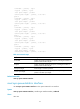
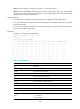
Forwarded: 0 packets, 0 bytes
Dropped: 0 packets, 0 bytes
Total queue length: 0 packets
Current queue length: 0 packets, 0% use ratio
Queue 4
Forwarded: 0 packets, 0 bytes
Dropped: 0 packets, 0 bytes
Total queue length: 0 packets
Current queue length: 0 packets, 0% use ratio
Queue 5
Forwarded: 0 packets, 0 bytes
Dropped: 0 packets, 0 bytes
Total queue length: 0 packets
Current queue length: 0 packets, 0% use ratio
Queue 6
Forwarded: 0 packets, 0 bytes
Dropped: 0 packets, 0 bytes
Total queue length: 0 packets
Current queue length: 0 packets, 0% use ratio
Queue 7
Forwarded: 0 packets, 0 bytes
Dropped: 0 packets, 0 bytes
Total queue length: 0 packets
Current queue length: 0 packets, 0% use ratio
Table 36 Command output
Field Descri
p
tion
Forwarded
Number of packets forwarded by the queue, including the number of
packets and the number of bytes.
Dropped
Number of packets dropped by the queue, including the number of
packets and the number of bytes.
Total queue length Queue length in number of packets.
Current queue length
Number of packets buffered by the queue and percentage of these
packets to the total queue length.
Related commands
reset qos queue-statistics interface
reset qos queue-statistics interface
Use reset qos queue-statistics interface to clear queue statistics for an interface.
Syntax
reset qos queue-statistics interface [ interface-type interface-number ] outbound
Views
User view