
R211x-HP Flexfabric 11900 ACL and QoS Command Reference

29
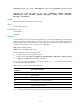
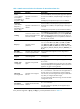
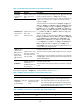
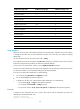
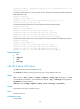
ICMPv6 messa
g
e name ICMPv6 messa
g
e
t
yp
e
ICMPv6 messa
g
e code
err-Header-field 4 0
frag-time-exceeded 3 1
hop-limit-exceeded 3 0
host-admin-prohib 1 1
host-unreachable 1 3
neighbor-advertisement 136 0
neighbor-solicitation 135 0
network-unreachable 1 0
packet-too-big 2 0
port-unreachable 1 4
redirect 137 0
router-advertisement 134 0
router-solicitation 133 0
unknown-ipv6-opt 4 2
unknown-next-hdr 4 1
Usage guidelines
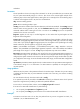
Within an ACL, the permit or deny statement of each rule must be unique. If the ACL rule you are creating
or editing has the same deny or permit statement as another rule in the ACL, your creation or editing
attempt fails.
You can edit ACL rules only when the match order is config.
If no optional keywords are provided in the undo rule command, you delete the entire rule. If optional
keywords or arguments are provided, you delete the specified attributes.
To view rules in an ACL and their rule IDs, use the display acl ipv6 all command.
If an ACL is to match information in the IPv6 packet payload, it cannot match the packet with more than
two extension headers or with the Encapsulating Security Payload Header.
If an ACL is for QoS traffic classification or packet filtering:
• Do not specify the vpn-instance or fragment keyword.
• Do not specify neq for the operator argument.
• In addition, if the ACL is for outbound QoS traffic classification or packet filtering:
{ Do not specify gt, lt, or range for the operator argument.
{ Do not specify the flow-label or routing keyword.
{ Do not set the value to 0, 43, 44, 51 , 60, ipv6-ah, or ipv6-esp for the protocol argument.
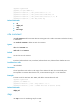
Examples
# Create an IPv6 advanced ACL rule to permit TCP packets with the destination port 80 from
2030:5060::/64 to FE80:5060::/96.
<Sysname> system-view
[Sysname] acl ipv6 number 3000