
R211x-HP Flexfabric 11900 ACL and QoS Command Reference
43
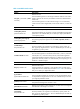
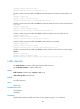
• remark-lp-pass new-local-precedence: Sets the local precedence value of the packet to
new-local-precedence and permits the packet to pass through. The new-local-precedence argument
ranges from 0 to 7.
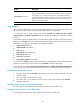
Usage guidelines
A QoS policy that references the traffic behavior can be applied in either the inbound direction or
outbound direction of an interface.
If you configure the car command multiple times in the same traffic behavior, the most recent
configuration takes effect.
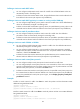
Examples
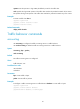
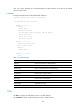
# Configure a CAR action in traffic behavior database:
• Set the CIR to 256 kbps, CBS to 51200 bytes, and EBS to 0.
• Transmit the conforming packets, and mark the excess packets with DSCP value 0 and transmit
them.
<Sysname> system-view
[Sysname] traffic behavior database
[Sysname-behavior-database] car cir 256 cbs 51200 ebs 0 green pass red remark-dscp-pass
0
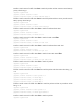
display traffic behavior
Use display traffic behavior to display traffic behavior information.
Syntax
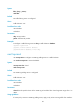
In standalone mode:
display traffic behavior user-defined [ behavior-name ] [ slot slot-number ]
In IRF mode:
display traffic behavior user-defined [ behavior-name ] [ chassis chassis-number slot slot-number ]
Views
Any view
Predefined user roles
network-admin
network-operator
mdc-admin
mdc-operator
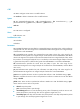
Parameters
user-defined: Displays user-defined traffic behaviors.
behavior-name: Behavior name, a case-sensitive string of 1 to 31 characters. If no traffic behavior is
specified, this command displays information about all traffic behaviors.
slot slot-number: Specifies a card by its slot number. If no card is specified, this command displays the
traffic behaviors on all cards. (In standalone mode.)
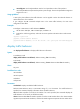
chassis chassis-number slot slot-number: Specifies a card on an IRF member device. The chassis-number
argument represents the IRF member ID, and the slot-number argument represents the slot number of the