
R211x-HP Flexfabric 11900 ACL and QoS Command Reference

44
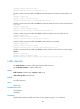
card. If no card is specified, this command displays the traffic behaviors on all cards of all member
devices. (In IRF mode.)
Examples
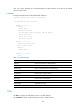
# Display information about user-defined traffic behaviors.
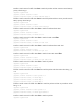
<Sysname> display traffic behavior user-defined
User-defined behavior information:
Behavior: 1 (ID 100)
Marking:
Remark dscp 3
Committed Access Rate:
CIR 128 (kbps), CBS 8192 (Bytes), EBS 512 (Bytes)
Green action: pass
Yellow action: pass
Red action: discard
Behavior: 2 (ID 101)
Accounting enable: Packet
Filter enable: Permit
Marking:
Remark dot1p 1
Behavior: 3 (ID 102)
-none-
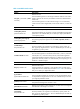
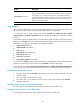
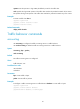
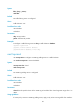
Table 17 Command output
Field Descri
p
tion
Behavior Name and contents of a traffic behavior.
Marking Information about priority marking.
Remark dscp Action of setting the DSCP value for packets.
Committed Access Rate Information about the CAR action.
Green action Action to take on green packets.
Yellow action Action to take on yellow packets.
Red action Action to take on red packets.
Accounting enable Traffic accounting action.
Filter enable Traffic filtering action.
none No other traffic behavior is configured.
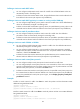
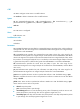
filter
Use filter to configure a traffic filtering action in a traffic behavior.
Use undo filter to delete a traffic filtering action from a traffic behavior.