
R211x-HP Flexfabric 11900 ACL and QoS Command Reference

66
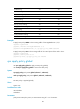
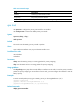
Traffic filtering Yes Yes
Traffic mirroring to an interface Yes Yes
Outer VLAN tag encapsulation Yes No
Traffic redirecting Yes No
CVLAN marking Yes Yes
SVLAN marking Yes Yes
802.1p priority marking Yes Yes
Drop precedence marking Yes No
DSCP marking Yes Yes
IP precedence marking Yes Yes
Local precedence marking Yes No
Local QoS ID marking Yes No
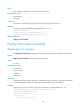
Examples
# Apply QoS policy USER1 to the incoming traffic of Ten-GigabitEthernet 1/0/1.
<Sysname> system-view
[Sysname] interface Ten-GigabitEthernet 1/0/1
[Sysname-Ten-GigabitEthernet1/0/1] qos apply policy USER1 outbound
# Apply QoS policy aaa to the incoming traffic of the control plane of the card in slot 3.
<Sysname> system-view
[Sysname] control-plane slot 3
[Sysname-cp-slot3] qos apply policy aaa inbound
qos apply policy global
Use qos apply policy global to apply a QoS policy globally.
Use undo qos apply policy global to remove the QoS policy.
Syntax
qos apply policy policy-name global { inbound | outbound }
undo qos apply policy policy-name global { inbound | outbound }
Default
No QoS policy is applied globally.
Views
System view
Predefined user roles
network-admin
mdc-admin
Parameters
policy-name: QoS policy name, a case-sensitive string of 1 to 31 characters.