
R211x-HP Flexfabric 11900 ACL and QoS Command Reference

75
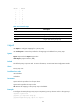
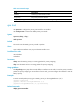
Table 27 Command output
Field Descri
p
tion
Interface Interface type and interface number.
Port priority Port priority set for the interface.
Port priority trust type Priority trust mode on the interface: dot1p or dscp.
qos trust
Use qos trust to configure the priority trust mode for an interface.
Use undo qos trust to restore the default priority trust mode.
Syntax
qos trust { dot1p | dscp }
undo qos trust
Default
The switch trusts the 802.1p priority carried in packets.
Views
Layer 2 Ethernet interface view, Layer 3 Ethernet interface view
Predefined user roles
network-admin
mdc-admin
Parameters
dot1p: Uses the 802.1p priority in incoming packets for priority mapping.
dscp: Uses the DSCP value in incoming packets for priority mapping.
Usage guidelines
The dscp-dot1p priority map does not take effect on interfaces on SF cards. To use the priority carried in
packets for priority mapping on an interface of an SF card, you must configure the interface to trust the
802.1p priority.
Examples
# Set the trusted packet priority type to 802.1p priority on Ten-GigabitEthernet 1/0/1.
<Sysname> system-view
[Sysname] interface Ten-GigabitEthernet 1/0/1
[Sysname-Ten-GigabitEthernet1/0/1] qos trust dot1p
Related commands
display qos trust interface