
R211x-HP Flexfabric 11900 ACL and QoS Command Reference

78
Views
Any view
Predefined user roles
network-admin
network-operator
mdc-admin
mdc-operator
Parameters
interface-type interface-number: Specifies an interface by its type and number. If no interface is specified,
this command displays the rate limit configuration and statistics on all the interfaces.
Examples
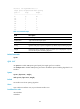
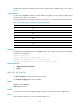
# Display the rate limit configuration and statistics on all the interfaces.
<Sysname> display qos lr interface
Interface : Ten-GigabitEthernet1/0/1
Direction: Inbound
CIR 12800 (kbps), CBS 800256 (Bytes)
Interface : Ten-GigabitEthernet1/0/2
Direction: Outbound
CIR 25600 (kbps), CBS 1600000 (Bytes)
Table 29 Command output
Field Descri
p
tion
Interface Interface type and interface number.
Direction Direction to which the rate limit configuration is applied: inbound or outbound.
CIR CIR in kbps.
CBS CBS in bytes, which specifies the depth of the token bucket for holding bursty traffic.
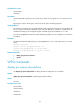
qos lr
Use qos lr to limit the rate of packets on the interface.
Use undo qos lr to remove the rate limit.
Syntax
qos lr { inbound | outbound } cir committed-information-rate [ cbs committed-burst-size ]
undo qos lr { inbound | outbound }
Default
Rate limit is not configured on an interface.
Views
Layer 2 Ethernet interface view, Layer 3 Ethernet interface view