
R211x-HP Flexfabric 11900 ACL and QoS Command Reference

80
Congestion management commands
SP commands
display qos queue sp interface
Use display qos queue sp interface to view the SP queuing configuration of an interface.
Syntax
display qos queue sp interface [ interface-type interface-number ]
Views
Any view
Predefined user roles
network-admin
network-operator
mdc-admin
mdc-operator
Parameters
interface-type interface-number: Specifies an interface by its type and number. If no interface is specified,
this command displays the SP queuing configuration of all the interfaces.
Examples
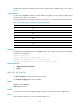
# Display the SP queuing configuration of Ten-GigabitEthernet 1/0/1.
<Sysname> display qos queue sp interface Ten-GigabitEthernet 1/0/1
Interface: Ten-GigabitEthernet1/0/1
Output queue: Strict Priority queuing
Table 30 Command output
Field Descri
p
tion
Interface Interface type and interface number.
Output queue Type of the current output queue.
Related commands
qos sp
qos sp
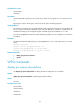
Use qos sp to configure SP queuing on an interface.
Use undo qos sp to restore the default.