
R211x-HP Flexfabric 11900 ACL and QoS Command Reference


86
Parameters
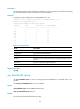
interface-type interface-number: Specifies an interface by its type and number. If no interface is specified,
this command displays the WFQ configuration of all the interfaces.
Examples
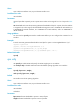
# Display the WFQ configuration of Ten-GigabitEthernet 1/0/1.
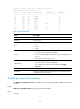
<Sysname> display qos queue wfq interface ten-gigabitethernet 1/0/1
Interface: Ten-GigabitEthernet1/0/1
Output queue: Hardware Weighted Fair Queuing
Queue ID Group Byte-count Min-Bandwidth
----------------------------------------------------------------
be 1 1 64
af1 1 1 64
af2 1 1 64
af3 1 1 64
af4 1 1 64
ef 2 1 64
cs6 2 1 64
cs7 2 1 64
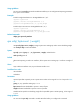
Table 33 Command output
Field Descri
p
tion
Interface Interface type and interface number.
Output queue Type of the current output queue.
Queue ID ID of a queue.
Group
Number of the group that holds the queue. By default, all queues are in
group 1.
Byte-count Byte-count scheduling weight of the queue.
Min-Bandwidth Minimum guaranteed bandwidth.
Related commands
qos wfq
qos bandwidth queue
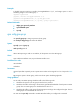
Use qos bandwidth queue to set the minimum guaranteed bandwidth for a specified queue on an
interface.
Use undo qos bandwidth queue to restore the default.
Syntax
qos bandwidth queue queue-id min bandwidth-value
undo qos bandwidth queue queue-id
Default
The minimum guaranteed bandwidth is 64 kbps.