
R211x-HP Flexfabric 11900 ACL and QoS Command Reference

91
• Set the minimum guaranteed bandwidth to 100 kbps for queue 0.
<Sysname> system-view
[Sysname] qos qmprofile myprofile
[Sysname-qmprofile-myprofile] queue 0 wfq group 1 weight 1
[Sysname-qmprofile-myprofile] bandwidth queue 0 min 100
Related commands
• display qos qmprofile interface
• qos qmprofile
• queue
display qos qmprofile configuration
Use display qos qmprofile configuration to display queue scheduling profile configurations.
Syntax
In standalone mode:
display qos qmprofile configuration [ profile-name ] [ slot slot-number ]
In IRF mode:
display qos qmprofile configuration [ profile-name ] [ chassis chassis-number slot slot-number ]
Views
Any view
Predefined user roles
network-admin
network-operator
mdc-admin
mdc-operator
Parameters
profile-name: Specifies the queue scheduling profile name, a string of 1 to 31 case-sensitive characters.
slot slot-number: Specifies a card by its slot number. (In standalone mode.)
chassis chassis-number slot slot-number: Specifies a card on an IRF member device. The chassis-number
argument refers to the ID of the IRF member device, and the slot-number argument refers to the number
of the slot where the card resides. (In IRF mode.)
Usage guidelines
If no queue scheduling profile is specified, this command displays the configuration of all queue
scheduling profiles.
If no slot number is specified, this command displays information about all queue scheduling profiles. (In
standalone mode.)
If no slot or IRF member ID is specified, this command displays information about all queue scheduling
profiles. (In IRF mode.)
Examples
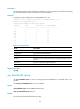
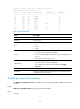
# Display the configuration of queue scheduling profile myprofile.