
R211x-HP Flexfabric 11900 ACL and QoS Configuration Guide

4
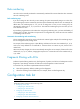
Tasks at a
g
lance
(Optional.) Copying an ACL
(Optional.) Configuring packet filtering with ACLs
Configuring a basic ACL
This section describes procedures for configuring IPv4 and IPv6 basic ACLs.
Configuring an IPv4 basic ACL
IPv4 basic ACLs match packets based only on source IP addresses.
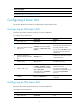
To configure an IPv4 basic ACL:
Ste
p
Command Remarks
4. Enter system view.
system-view N/A
5. Create an IPv4 basic ACL and
enter its view.
acl number acl-number [ name
acl-name ] [ match-order { auto |
config } ]
By default, no ACL exists.
IPv4 basic ACLs are numbered in
the range of 2000 to 2999.
You can use the acl name acl-name
command to enter the view of a
named ACL.
6. (Optional.) Configure a
description for the IPv4 basic
ACL.
description text
By default, an IPv4 basic ACL has
no ACL description.
7. (Optional.) Set the rule
numbering step.
step step-value The default setting is 5.
8. Create or edit a rule.
rule [ rule-id ] { deny | permit }
[ counting | fragment | source
{ source-address source-wildcard |
any } | time-range
time-range-name | vpn-instance
vpn-instance-name ] *
By default, an IPv4 basic ACL does
not contain any rule.
If an ACL is for QoS traffic
classification or packet filtering, do
not specify the vpn-instance
keyword.
9. (Optional.) Add or edit a rule
comment.
rule rule-id comment text
By default, no rule comments are
configured.
Configuring an IPv6 basic ACL
IPv6 basic ACLs match packets based only on source IP addresses.
To configure an IPv6 basic ACL:
Ste
p
Command Remarks
1. Enter system view.
system-view N/A