
R211x-HP Flexfabric 11900 ACL and QoS Configuration Guide

6
Ste
p
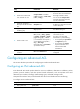
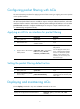
Command Remarks
2. Create an IPv4 advanced
ACL and enter its view.
acl number acl-number [ name
acl-name ] [ match-order { auto |
config } ]
By default, no ACL exists.
IPv4 advanced ACLs are
numbered in the range of 3000 to
3999.
You can use the acl name acl-name
command to enter the view of a
named ACL.
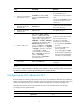
3. (Optional.) Configure a
description for the IPv4
advanced ACL.
description text
By default, an IPv4 advanced ACL
has no ACL description.
4. (Optional.) Set the rule
numbering step.
step step-value The default setting is 5.
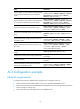
5. Create or edit a rule.
rule [ rule-id ] { deny | permit }
protocol [ { { ack ack-value | fin
fin-value | psh psh-value | rst rst-value
| syn syn-value | urg urg-value } * |
established } | counting | destination
{ dest-address dest-wildcard | any } |
destination-port operator port1
[ port2 ] | { dscp dscp | { precedence
precedence | tos tos } * } | fragment
| icmp-type { icmp-type [ icmp-code ]
| icmp-message } | source
{ source-address source-wildcard |
any } | source-port operator port1
[ port2 ] | ti
me-range
time-range-name | vpn-instance
vpn-instance-name ] *
By default, an IPv4 advanced ACL
does not contain any rule.
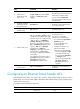
If an ACL is for QoS traffic
classification or packet filtering:
• Do not specify the vpn-instance
keyword.
• Do not specify neq for the
operator argument.
• Do not specify gt, lt, or range
for the operator argument if the
ACL is for outbound QoS traffic
classification or packet filtering.
6. (Optional.) Add or edit a
rule comment.
rule rule-id comment text
By default, no rule comments are
configured.
NOTE:
If an ACL is to match information in the IPv6 packet payload, it cannot match the packet with more than
two extension headers or with the Encapsulating Security Payload Header.
Configuring an IPv6 advanced ACL
IPv6 advanced ACLs match packets based on the source IPv6 addresses, destination IPv6 addresses,
packet priorities, protocol numbers, and other protocol header fields such as the TCP/UDP source port
number, TCP/UDP destination port number, ICMPv6 message type, and ICMPv6 message code.
Compared to IPv6 basic ACLs, IPv6 advanced ACLs allow more flexible and accurate filtering.
To configure an IPv6 advanced ACL:
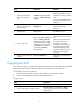
Ste
p
Command Remarks
1. Enter system view.
system-view N/A