
R211x-HP Flexfabric 11900 ACL and QoS Configuration Guide

7
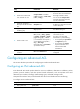
Ste
p
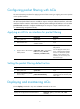
Command Remarks
2. Create an IPv6
advanced ACL and
enter its view.
acl ipv6 number acl-number [ name
acl-name ] [ match-order { auto |
config } ]
By default, no ACL exists.
IPv6 advanced ACLs are numbered
in the range of 3000 to 3999.
You can use the acl ipv6 name
acl-name command to enter the view
of a named ACL.
3. (Optional.) Configure
a description for the
IPv6 advanced ACL.
description text
By default, an IPv6 advanced ACL
has no ACL description.
4. (Optional.) Set the rule
numbering step.
step step-value The default setting is 5.
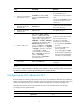
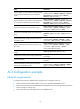
5. Create or edit a rule.
rule [ rule-id ] { deny | permit } protocol
[ { { ack ack-value | fin fin-value | psh
psh-value | rst rst-value | syn syn-value
| urg urg-value } * | established } |
counting | destination { dest-address
dest-prefix | dest-address/dest-prefix |
any } | destination-port operator port1
[ port2 ] | dscp dscp | flow-label
flow-label-value | fragment |
icmp6-type { icmp6-type icmp6-code |
icmp6-message } | routing [ type
routing-type ] | source { source-address
source-prefix |
source-address/source-prefix | any } |
source-port operator port1 [ port2 ] |
time-range time-range-name |
vpn-instance vpn-insta
nce-name ] *
By default, IPv6 advanced ACL does
not contain any rule.
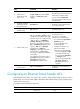
If an ACL is for QoS traffic
classification or packet filtering:
• Do not specify the vpn-instance or
fragment keyword.
• Do not specify neq for the
operator argument.
• In addition, if the ACL is for
outbound QoS traffic
classification or packet filtering:
{ Do not specify gt, lt, or range
for the operator argument.
{ Do not specify the flow-label
or routing keyword.
{ Do not set the value to 0, 43,
44, 51 , 60, ipv6-ah, or
ipv6-esp for the protocol
argument.
6. (Optional.) Add or edit
a rule comment.
rule rule-id comment text
By default, no rule comments are
configured.
Configuring an Ethernet frame header ACL
Ethernet frame header ACLs, also called "Layer 2 ACLs," match packets based on Layer 2 protocol
header fields, such as source MAC address, destination MAC address, 802.1p priority (VLAN priority),
and link layer protocol type.
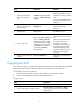
To configure an Ethernet frame header ACL:
Ste
p
Command Remarks
1. Enter system view.
system-view N/A