
R211x-HP Flexfabric 11900 ACL and QoS Configuration Guide

9
Configuring packet filtering with ACLs
This section describes procedures for applying an ACL to filter incoming or outgoing IPv4 or IPv6 packets
on the specified interface.
NOTE:
The ACL-based packet filter function is available on Layer 2 and Layer 3 Ethernet interfaces, and VLAN
interfaces. The term "interface" in this section collectively refers to these types of interfaces. You can use the
port link-mode command to configure an Ethernet port as a Layer 2 or Layer 3 interface (see
Layer
2—LAN Switching Configuration Guide
).
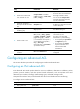
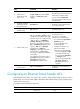
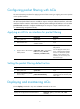
Applying an ACL to an interface for packet filtering
Ste
p
Command
Remarks
1. Enter system view.
system-view N/A
2. Enter interface view.
interface interface-type
interface-number
N/A
3. Apply an ACL to the interface
to filter packets.
packet-filter [ ipv6 ] { acl-number |
name acl-name } { inbound |
outbound } [ hardware-count ]
By default, an interface does not
filter packets.
You can apply IPv4 ACLs, IPv6
ACLs, or Ethernet frame header
ACLs to an interface for packet
filtering. In one direction of an
interface, you can use only one
ACL of each type.
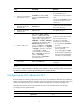
Setting the packet filtering default action
Ste
p
Command
Remarks
1. Enter system view.
system-view N/A
2. Set the packet filtering default
action to deny.
packet-filter default deny
By default, the packet filter permits
packets that do not match any ACL
rule to pass.
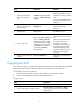
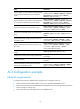
Displaying and maintaining ACLs
Execute display commands in any view and reset commands in user view.
Task Command
Display ACL configuration and match statistics.
display acl [ ipv6 ] { acl-number | all | name
acl-name }