
R211x-HP Flexfabric 11900 ACL and QoS Configuration Guide



20
QoS policies applied to an interface, a VLAN, and globally are in descending order of priority. In other
words, the switch first matches the criteria in the QoS policy applied to an interface. If there is a match,
the switch executes the QoS policy applied to the interface and ignores the QoS policies applied to the
VLAN and globally.
Applying the QoS policy to an interface
This feature is available on both Layer 2 and Layer 3 Ethernet interfaces. The term "interface" in this
section collectively refers to these two types of interfaces. You can use the port link-mode command to
configure an Ethernet port as a Layer 2 or Layer 3 interface (see Layer 2—LAN Switching Configuration
Guide).
A QoS policy can be applied to multiple interfaces, but only one QoS policy can be applied to one
direction (inbound or outbound) of an interface.
The QoS policy applied to the outgoing traffic on an interface does not regulate local packets, which are
critical protocol packets sent by the local system for operation maintenance. The most common local
packets include link maintenance, routing (IS-IS, BGP, and OSPF for example), RIP, LDP, RSVP, and SSH
packets.
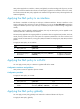
To apply the QoS policy to an interface:
Ste
p
Command
Remarks
1. Enter system view.
system-view N/A
2. Enter interface view.
interface interface-type interface-number N/A
3. Apply the QoS policy to
the interface.
qos apply policy policy-name { inbound |
outbound }
By default, no QoS policy
is applied to an interface.
Applying the QoS policy to a VLAN
You can apply a QoS policy to a VLAN to regulate traffic of the VLAN.
Configuration restrictions and guidelines
QoS policies cannot be applied to dynamic VLANs.
Configuration procedure
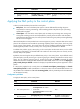
To apply the QoS policy to a VLAN:
Ste
p
Command
Remarks
1. Enter system view.
system-view N/A
2. Apply the QoS policy to
VLANs.
qos vlan-policy policy-name vlan
vlan-id-list { inbound | outbound }
By default, no QoS policy is applied
to a VLAN.
Applying the QoS policy globally
You can apply a QoS policy globally to the inbound or outbound direction of all ports.
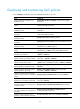
To apply the QoS policy globally: