
R211x-HP Flexfabric 11900 ACL and QoS Configuration Guide

21
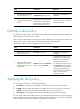
Ste
p
Command
Remarks
1. Enter system view.
system-view N/A
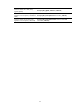
2. Apply the QoS policy
globally.
qos apply policy policy-name global
{ inbound | outbound }
By default, no QoS policy is applied
globally.
Applying the QoS policy to the control plane
A device provides the data plane and the control plane.
• Data plane—The units at the data plane (such as various dedicated forwarding chips) are
responsible for receiving, transmitting, and forwarding packets. They deliver super processing
speeds and throughput.
• Control plane—The units at the control plane (such as CPUs) are processing units running most
routing and switching protocols and responsible for protocol packet resolution and calculation.
Compared with data plane units, the control plane units allow for great packet processing flexibility
but have lower throughput.
When the data plane receives packets that it cannot recognize or process, it transmits them to the control
plane. If the transmission rate exceeds the processing capability of the control plane, which very likely
occurs at times of DoS attacks, the control plane will be busy handling undesired packets and fail to
handle legitimate packets correctly or timely. As a result, protocol performance is affected.
To address this problem, apply a QoS policy to the control plane to take QoS actions, such as traffic
accounting or rate limiting, on inbound traffic. This makes sure the control plane can correctly receive,
transmit, and process packets.
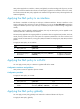
By default, the switch applies the pre-defined QoS policy to the control plane. A pre-defined control
plane QoS policy uses the protocol type or protocol group type to identify the packets sent to the control
plane. You can reference protocol types or protocol group types in if-match commands for traffic
classification and then reconfigure traffic behaviors for these traffic classes. You can use the display qos
policy control-plane pre-defined command to display the pre-defined QoS policies applied to control
planes.
If a QoS policy applied to the control plane uses if-match control-plane protocol-group or if-match
control-plane protocol for traffic classification in a class, the action in the associated traffic behavior can
only be car or the combination of car and accounting packet, and only the cir keyword in the car action
can be applied correctly.
Configuration procedure
To apply the QoS policy to the control plane:
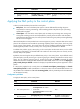
Ste
p
Command
Remarks
1. Enter system view.
system-view N/A
2. Enter control plane view.
• In standalone mode:
control-plane slot slot-number
• In IRF mode:
control-plane chassis chassis-number
slot slot-number
N/A
3. Apply the QoS policy to
the control plane.
qos apply policy policy-name inbound
By default, no QoS policy is
applied to a control plane.