
R211x-HP Flexfabric 11900 ACL and QoS Configuration Guide


30
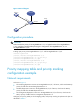
Figure 6 Network diagram
Configuration procedure
IMPORTANT:
Make sure that the priority of Ten-GigabitEthernet 1/0/1 is higher than that of Ten-GigabitEthernet
1/0/2, and that no trusted packet priority type is configured on Ten-GigabitEthernet 1/0/1 or
Ten-GigabitEthernet 1/0/2.
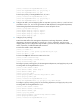
# Assign port priority to Ten-GigabitEthernet 1/0/1 and Ten-GigabitEthernet 1/0/2.
<DeviceC> system-view
[DeviceC] interface Ten-GigabitEthernet 1/0/1
[DeviceC-Ten-GigabitEthernet1/0/1] qos priority 3
[DeviceC-Ten-GigabitEthernet1/0/1] quit
[DeviceC] interface Ten-GigabitEthernet 1/0/2
[DeviceC-Ten-GigabitEthernet1/0/2] qos priority 1
[DeviceC-Ten-GigabitEthernet1/0/2] quit
Priority mapping table and priority marking
configuration example
Network requirements
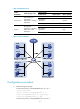
As shown in Figure 7:
• The marketing department connects to Ten-GigabitEthernet1/0/1 of Device, which sets the 802.1p
priority of traffic from the marketing department to 3.
• The R&D department connects to Ten-GigabitEthernet1/0/2 of Device, which sets the 802.1p
priority of traffic from the R&D department to 4.
• The management department connects to Ten-GigabitEthernet1/0/3 of Device, which sets the
802.1p priority of traffic from the management department to 5.
Configure port priority, 802.1p-to-local mapping table, and priority marking to implement the plan as
described in Table 6.
Internet
Device A
Device C
Server
Device B
XGE1/0/3
X
G
E
1
/
0
/
1
X
G
E
1
/
0
/
2