
R211x-HP Flexfabric 11900 ACL and QoS Configuration Guide

39
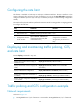
Configuring the rate limit
This feature is available on both Layer 2 and Layer 3 Ethernet interfaces. The term "interface" in this
section collectively refers to these two types of interfaces. You can use the port link-mode command to
configure an Ethernet port as a Layer 2 or Layer 3 interface (see Layer 2—LAN Switching Configuration
Guide).
The rate limit of a physical interface specifies the maximum rate of incoming packets or outgoing packets.
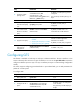
To configure the rate limit:
Ste
p
Command
Remarks
1. Enter system view.
system-view N/A
2. Enter interface view.
interface interface-type interface-number
N/A
3. Configure the rate limit
for the interface.
qos lr { inbound | outbound } cir
committed-information-rate [ cbs
committed-burst-size ]
By default, rate limit is not
configured on an interface.
The granularity of rate limit is 8
kbps.
Displaying and maintaining traffic policing, GTS,
and rate limit
Execute display commands in any view.
Task Command
Display QoS and ACL resource usage (in
standalone mode).
display qos-acl resource [ slot slot-number ]
Display QoS and ACL resource usage (in IRF
mode).
display qos-acl resource [ chassis chassis-number slot
slot-number ]
Display traffic behavior configuration. display traffic behavior user-defined [ behavior-name ]
Display GTS configuration and statistics on
an interface.
display qos gts interface [ interface-type interface-number ]
Display rate limit configuration and statistics
on an interface.
display qos lr interface [ interface-type interface-number ]
Traffic policing and GTS configuration example
Network requirements
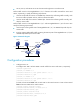
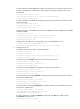
As shown in Figure 12:
• Ten-GigabitEthernet 1/0/3 of Device A is connected to Ten-GigabitEthernet1/0/1 of Device B.