
R211x-HP Flexfabric 11900 ACL and QoS Configuration Guide

45
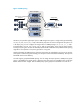
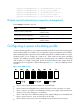
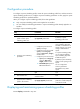
Figure 15 WRR queuing
Assume a port provides eight output queues. WRR assigns each queue a weight value (represented by
w7, w6, w5, w4, w3, w2, w1, or w0) to decide the proportion of resources assigned to the queue. On
a 10 Gbps port, you can configure the weight values of WRR queuing to 5, 5, 3, 3, 1, 1, 1, and 1
(corresponding to w7, w6, w5, w4, w3, w2, w1, and w0, respectively). In this way, the queue with the
lowest priority can get a minimum of 500 Mbps of bandwidth. WRR solves the problem that SP queuing
might fail to serve packets in low-priority queues for a long time.
Another advantage of WRR queuing is that when the queues are scheduled in turn, the service time for
each queue is not fixed. If a queue is empty, the next queue will be scheduled immediately. This improves
bandwidth resource use efficiency.
SF cards support group-based WRR queuing. You can assign the output queues to WRR priority queue
group 1 and WRR priority queue group 2. Queues in the same group are scheduled in the round robin
fashion based on their weights. The two WRR priority queue groups are scheduled in the ratio of 1:1.
Queue 0 Weight 1
……
Queue 1 Weight 2
Queue N-2Weight N-1
Queue N-1 Weight N
Packets to be sent through
this port
Sent packets
Interface
Queue
scheduling
Sending queue
Packet
classification