
R211x-HP Flexfabric 11900 ACL and QoS Configuration Guide

47
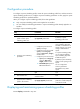
• Configure a queue scheduling profile, as described in "Configuring a queue scheduling profile."
Tasks at a
g
lance
Perform one of the following tasks to configure congestion management on a per-port basis:
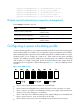
• Configuring SP queuing
• Configuring WRR queuing
• Configuring WFQ queuing
•
Configuring SP+WRR queuing
• Configuring SP+WFQ queuing
Configuring a queue scheduling profile
Configuring congestion management on a per-port
basis
This feature is available on both Layer 2 and Layer 3 Ethernet interfaces. The term "interface" in this
section collectively refers to these two types of interfaces. You can use the port link-mode command to
configure an Ethernet port as a Layer 2 or Layer 3 interface (see Layer 2—LAN Switching Configuration
Guide).
Configuring SP queuing
Configuration procedure
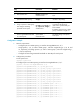
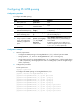
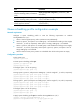
To configure SP queuing:
Ste
p
Command
Remarks
1. Enter system view.
system-view N/A
2. Enter interface view.
interface interface-type
interface-number
N/A
3. (Optional.) Configure
SP queuing.
qos sp
The default queuing algorithm on an
interface is SP queuing.
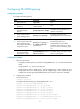
Configuration example
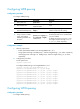
Configure Ten-GigabitEthernet 1/0/1 to use SP queuing:
# Enter system view
<Sysname> system-view
# Configure Ten-GigabitEthernet1/0/1 to use SP queuing.
[Sysname] interface Ten-GigabitEthernet 1/0/1
[Sysname-Ten-GigabitEthernet1/0/1] qos sp