
R211x-HP Flexfabric 11900 ACL and QoS Configuration Guide

48
Configuring WRR queuing
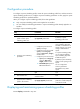
Configuration procedure
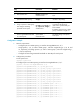
To configure WRR queuing:
Ste
p
Command
Remarks
1. Enter system view.
system-view N/A
2. Enter interface view.
interface interface-type
interface-number
N/A
3. Enable byte-count or
packet-based WRR queuing.
qos wrr { byte-count |
weight }
The default queuing algorithm on an
interface is byte-count SP queuing.
4. Assign a queue to a WRR
group, and configure
scheduling parameters for
the queue.
qos wrr queue-id group { 1 |
2 } { byte-count | weight }
schedule-value
Select weight or byte-count according to
the WRR type (byte-count or packet-based)
you have enabled.
By default, all queues are in group 1, and
the weights of queues 0 through 7 are 1, 2,
3, 4, 5, 6, 7, and 8, respectively.
Configuration example
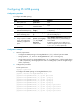
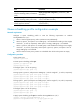
1. Network requirements
{ Enable packet-based WRR on port Ten-GigabitEthernet 1/0/1.
{ Assign queues 0 through 3 to WRR group 1, with their weights being 1, 2, 4, and 6, respectively,
and assign queues 4 through 7 to WRR group 2, with their weights being 1, 2, 4, and 6,
respectively.
2. Configuration procedure
# Enter system view.
<Sysname> system-view
# Configure WRR queuing on Ten-GigabitEthernet 1/0/1.
[Sysname] interface Ten-GigabitEthernet 1/0/1
[Sysname-Ten-GigabitEthernet1/0/1] qos wrr weight
[Sysname-Ten-GigabitEthernet1/0/1] qos wrr 0 group 1 weight 1
[Sysname-Ten-GigabitEthernet1/0/1] qos wrr 1 group 1 weight 2
[Sysname-Ten-GigabitEthernet1/0/1] qos wrr 2 group 1 weight 4
[Sysname-Ten-GigabitEthernet1/0/1] qos wrr 3 group 1 weight 6
[Sysname-Ten-GigabitEthernet1/0/1] qos wrr 4 group 2 weight 1
[Sysname-Ten-GigabitEthernet1/0/1] qos wrr 5 group 2 weight 2
[Sysname-Ten-GigabitEthernet1/0/1] qos wrr 6 group 2 weight 4
[Sysname-Ten-GigabitEthernet1/0/1] qos wrr 7 group 2 weight 6
Configuring WFQ queuing
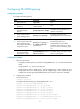
Configuration procedure
To configure WFQ queuing: