
R211x-HP Flexfabric 11900 ACL and QoS Configuration Guide

53
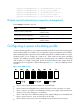
Configuration procedure
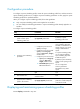
To configure a queue scheduling profile, create the queue scheduling profile first, and then enter the
queue scheduling profile view to configure its queue scheduling parameters. At last, apply the queue
scheduling profile to the specified interface.
When you configure a queue scheduling profile, follow these guidelines:
• Only one queue scheduling profile can be applied to an interface.
• You can modify the scheduling parameters in a queue scheduling profile already applied to an
interface.
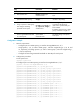
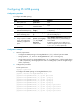
To configure a queue scheduling profile:
Ste
p
Command Remarks
1. Enter system view.
system-view N/A
2. Create a queue scheduling
profile and enter queue
scheduling profile view.
qos qmprofile profile-name
By default, no queue
scheduling profile exists.
3. Configure queue scheduling
parameters.
• Configure a queue to use SP:
queue queue-id sp
• Configure a queue to use WRR:
queue queue-id wrr group
group-id { byte-count | weight }
schedule-value
• Configure a queue to use WFQ:
a. queue queue-id wfq group
group-id { byte-count |
weight } schedule-value
b. bandwidth queue queue-id
min bandwidth-value
You can configure the same
queue scheduling algorithm,
SP+WRR, or SP+WFQ for all
queues. However, you cannot
configure WRR+WFQ for
queues.
In a queue scheduling profile,
you can configure different
queue scheduling algorithms
for different queues.
By default, a queue scheduling
profiles uses SP queuing for all
queues.
You can configure the
minimum guaranteed
bandwidth for only WFQ
queues.
4. Return to system view.
quit
N/A
5. Enter interface view.
interface interface-type
interface-number
N/A
6. Apply the queue scheduling
profile to the interface.
qos apply qmprofile profile-name
The default queue scheduling
profile of an interface depends
on the device model.
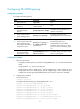
Displaying and maintaining queue scheduling profiles
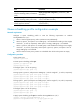
Execute display commands in any view.