
R211x-HP Flexfabric 11900 ACL and QoS Configuration Guide

65
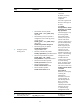
Ste
p
Command
Remarks
6. Configure a priority
marking action.
• Set the DSCP value for packets:
remark [ green | red | yellow ] dscp
dscp-value
• Set the 802.1p priority for packets or
configure the inner-to-outer tag priority
copying function:
remark [ green | red | yellow ] dot1p
dot1p-value
remark dot1p customer-dot1p-trust
• Set the drop priority for packets:
remark drop-precedence
drop-precedence-value
• Set the IP precedence for packets:
remark ip-precedence ip-precedence-value
• Set the local precedence for packets:
remark[ green | red | yellow ]
local-precedence local-precedence-value
• Set the local QoS ID for packets:
remark qos-local-id local-id-value
• Set the CVLAN for packets:
remark customer-vlan-id vlan-id
• Set the SVLAN for packets:
remark service-vlan-id vlan-id
Use one or more of the
commands.
By default, no priority
marking action is
configured.
The switch supports local
QoS IDs in the range of 1
to 3999.
The remark
local-precedence, remark
qos-local-id, and remark
drop-precedence
commands apply to only
the incoming traffic.
The customer VLAN
(CVLAN) is the private
network VLAN of the
customer, and the service
provider VLAN (SVLAN)
is the public network
VLAN assigned by the
service provider to the
customer. For more
information about the
CVLAN and SVLAN, see
Layer 2—LAN Switching
Configuration Guide.
If a traffic behavior
contains only a CVLAN
or SVLAN marking
action, the match criteria
of the associated traffic
class cannot contain only
if-match customer-vlan-id
or if-match
service-vlan-id.
Otherwise, a QoS policy
containing the
class-behavior
association cannot be
correctly applied. To
meet the requirements
above, use VLAN
mapping. For more
information about VLAN
mapping, see Layer
2—LAN Switching
Configuration Guide.
7. Return to system view.
quit N/A
8. Create a QoS policy and
enter QoS policy view.
qos policy policy-name
By default, no QoS policy
is configured.