
R211x-HP Flexfabric 11900 ACL and QoS Configuration Guide


66
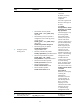
Ste
p
Command
Remarks
9. Associate the traffic class
with the traffic behavior in
the QoS policy.
classifier classifier-name behavior
behavior-name
By default, a traffic class
is not associated with a
traffic behavior.
10. Return to system view.
quit N/A
11. Apply the QoS policy.
• Applying the QoS policy to an interface
• Applying the QoS policy to a VLAN
• Applying the QoS policy globally
Choose one of the
application destinations
as needed.
By default, no QoS policy
is applied.
12. (Optional.) Display the
priority marking
configuration.
display traffic behavior user-defined
[ behavior-name ]
Available in any view.
Support for priority marking actions
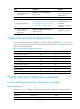
For a priority marking QoS policy applied to an interface, VLAN, or globally, Table 7 show the card
support for priority marking actions in the inbound and outbound directions. For more information about
cards, see the installation guide.
Table 7 Card support for priority marking actions
Action Inbound
Outbound
802.1p priority marking Yes Yes
Drop precedence marking Yes No
DSCP marking Yes Yes
IP precedence marking Yes Yes
Local precedence marking Yes No
Local QoS ID marking Yes No
CVLAN marking Yes Yes
SVLAN marking Yes Yes
Priority marking configuration examples
Local precedence marking configuration example
Network requirements
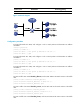
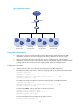
As shown in Figure 19, configure priority marking on the device to meet the following requirements:
Traffic source Destination
Processin
g
p
riorit
y
Host A, B Data server High
Host A, B Mail server Medium