
R211x-HP Flexfabric 11900 ACL and QoS Configuration Guide


69
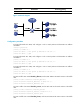
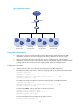
Figure 20 Network diagram
Configuration considerations
• Configure two classes to match the traffic from the administration department and the R&D
department, respectively, and then configure traffic policing behaviors for the two classes.
• Mark the same local QoS ID for the traffic from the two sub-departments of the marketing
department, configure a class to match packets with the local QoS ID, and then configure a traffic
policing behavior for the class to limit the outgoing traffic of the two sub-departments.
Configuration procedure
1. Limit the upstream traffic of the administration department and R&D department:
# Configure IPv4 basic ACL 2001 to match the outgoing traffic of the administration department.
<SwitchA> system-view
[SwitchA] acl number 2001
[SwitchA-acl-basic-2001] rule permit source 192.168.1.0 0.0.0.255
[SwitchA-acl-basic-2001] quit
# Configure IPv4 basic ACL 2002 to match the outgoing traffic of the R&D department.
[SwitchA] acl number 2002
[SwitchA-acl-basic-2002] rule permit source 192.168.2.0 0.0.0.255
[SwitchA-acl-basic-2002] quit
# Create class admin, and use ACL 2001 as the match criterion.
[SwitchA] traffic classifier admin
[SwitchA-classifier-admin] if-match acl 2001
[SwitchA-classifier-admin] quit
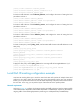
# Create class rd, and use ACL 2002 as the match criterion.
[SwitchA] traffic classifier rd
IP network
SwitchA
XGE1/0/1
Admin dept.
192.168.1.0/24
R&D dept.
192.168.2.0/24
Marketing dept1.
192.168.3.0/24
Marketing dept2.
192.168.4.0/24