
R211x-HP Flexfabric 11900 ACL and QoS Configuration Guide

72
Configuring nesting
Nesting adds a VLAN tag to the matching packets to allow the VLAN-tagged packets to pass through the
corresponding VLAN. For example, you can add an outer VLAN tag to packets from a customer network
to a service provider network. This allows the packets to pass through the service provider network by
carrying a VLAN tag assigned by the service provider.
Configuration procedure
To configure nesting:
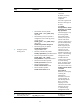
Ste
p
Command
Remarks
1. Enter system view.
system-view
N/A
2. Create a traffic class and
enter traffic class view.
traffic classifier classifier-name [ operator { and
| or } ]
By default, no traffic class
exists.
3. Configure match criteria.
if-match match-criteria
By default, no match
criterion is configured for
a traffic class.
For more information
about the match criteria,
see the if-match
command in ACL and
QoS Command
Reference.
4. Return to system view.
quit N/A
5. Create a traffic behavior
and enter traffic behavior
view.
traffic behavior behavior-name
By default, no traffic
behavior exists.
6. Configure a VLAN tag
adding action.
nest top-most vlan vlan-id
By default, no VLAN tag
adding action is
configured for a traffic
behavior.
7. Return to system view.
quit N/A
8. Create a QoS policy and
enter QoS policy view.
qos policy policy-name
By default, no QoS policy
exists.
9. Associate the traffic class
with the traffic behavior in
the QoS policy.
classifier classifier-name behavior
behavior-name
By default, no
class-behavior
association is configured
for a QoS policy.
10. Return to system view.
quit N/A