
R211x-HP Flexfabric 11900 ACL and QoS Configuration Guide


73
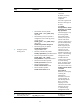
Ste
p
Command
Remarks
11. Apply the QoS policy.
• Applying the QoS policy to an interface
• Applying the QoS policy to a VLAN
• Applying the QoS policy globally
Choose one of the
application destinations
as needed.
By default, a QoS policy
is not applied.
Configuration example
Network requirements
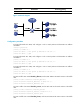
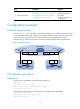
As shown in Figure 21, Site 1 and Site 2 in VPN A are two branches of a company, and they use VLAN
5 to transmit traffic. Because Site 1 and Site 2 are located in different areas, the two sites use the VPN
access service of a service provider. The service provider assigns VLAN 100 to the two sites.
Configure nesting, so that the two branches can communicate through the service provider network.
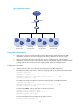
Figure 21 Network diagram
Configuration procedure
Configuring PE 1
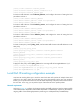
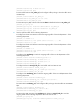
# Create a class named test to match traffic with CVLAN tag 5.
<PE1> system-view
[PE1] traffic classifier test
[PE1-classifier-test] if-match customer-vlan-id 5
[PE1-classifier-test] quit
# Configure an action of add outer VLAN tag 100 in the traffic behavior named test.
[PE1] traffic behavior test
[PE1-behavior-test] nest top-most vlan 100
[PE1-behavior-test] quit
PE 1
Public network
PE 2
IP network
VPN A
Site 1
VPN A
Site 2
CE 1
CE 2
VLAN 5
DataVLAN 100 VLAN 5 DataVLAN 100 VLAN 5
DataVLAN 5 DataVLAN 5
XGE1/0/1 XGE1/0/1
XGE1/0/2 XGE1/0/2