
R211x-HP Flexfabric 11900 ACL and QoS Configuration Guide


86
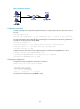
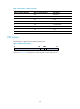
Figure 25 Network diagram
Configuration procedure
# Create a periodic time range during 8:00 and 18:00 on working days from June 2013 to the end of
the year.
<DeviceA> system-view
[DeviceA] time-range work 8:0 to 18:0 working-day from 0:0 6/1/2013 to 24:0 12/31/2013
# Create an IPv4 basic ACL numbered 2001, and configure a rule in the ACL to permit only packets from
192.168.1.2/32 during the time range work.
[DeviceA] acl number 2001
[DeviceA-acl-basic-2001] rule permit source 192.168.1.2 0 time-range work
[DeviceA-acl-basic-2001] rule deny source any time-range work
[DeviceA-acl-basic-2001] quit
# Apply IPv4 basic ACL 2001 to filter outgoing packets on interface Ten-GigabitEthernet 1/0/2.
[DeviceA] interface Ten-GigabitEthernet 1/0/2
[DeviceA-Ten-GigabitEthernet1/0/2] packet-filter 2001 outbound
[DeviceA-Ten-GigabitEthernet1/0/2] quit
Verifying the configuration
# Display time range configuration and status on Device A.
Current time is 13:19:14 7/30/2013 Tuesday
Time-range: work (Active)
08:00 to 18:00 working-day
from 00:00 6/1/2013 to 00:00 1/1/2014
The output shows that the time range work is active.