
R211x-HP Flexfabric 11900 EVB Command Reference
22
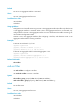
Default
No VSI or VSI aggregate interface is activated.
Views
VSI view, VSI aggregate interface view
Predefined user roles
network-admin
mdc-admin
Usage guidelines
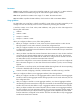
Configurations such as traffic monitoring on a VSI or VSI aggregate interface take effect only after the VSI
or VSI aggregate interface is activated. When a VSI or VSI aggregate interface is not activated, only
configure filters on the VSI or VSI aggregate interface. For more information about traffic monitoring, see
ACL and QoS Configuration Guide.
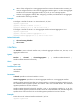
Activate a VSI or VSI aggregate interface after configuring a VSI filter, and deactivate a VSI or VSI
aggregate interface before removing a VSI filter.
Examples
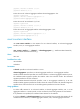
# Activate VSI S-Channel 1/0/1:10.1.
<Sysname> system-view
[Sysname] interface s-channel 1/0/1:10.1
[Sysname–S-Channel1/0/1:10.1] evb vsi active
# Activate VSI aggregate interface Schannel-Aggregation 1:10.1.
<Sysname> system-view
[Sysname] interface schannel-aggregation 1:10.1
[Sysname–Schannel-Aggregation1:10.1] evb vsi active
Related commands
evb vsi filter
evb vsi filter
Use evb vsi filter to configure a VSI filter.
Use undo evb vsi filter to remove a VSI filter.
Syntax
evb vsi filter [ group group-id ] vlan vlan-id [ mac mac-address ]
undo evb vsi filter [ group group-id ] [ vlan vlan-id [ mac mac-address ] ]
Default
No VSI filter exists.
Views
VSI view, VSI aggregate interface view
Predefined user roles
network-admin
mdc-admin