
R211x-HP Flexfabric 11900 FCoE Command Reference
12
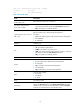
[Sysname-Vfc1] fc mode e
fcoe enable
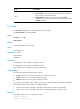
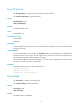
Use fcoe enable to enable FCoE for a VLAN and map a specified VSAN to the VLAN.
Use undo fcoe enable to disable FCoE for the VLAN.
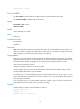
Syntax
fcoe enable [ vsan vsan-id ]
undo fcoe enable
Default
FCoE is disabled on a VLAN.
Views
VLAN view
Predefined user roles
network-admin
mdc-admin
Parameters
vsan vsan-id: Specifies a VSAN to be mapped to the VLAN. The vsan-id argument is in the range of 1 to
3839. If no VSAN is specified, the VSAN with the same number as the VLAN is mapped. For VLANs
3840 to 4094, you must manually specify VSANs to be mapped.
Usage guidelines
When you use a VFC interface to transmit packets, the Ethernet interface bound to the VFC interface
might allow multiple VLANs. You should enable FCoE for a VLAN and map a VSAN to the VLAN, so that
the packets from the VSAN are tagged with the VLAN tag and transmitted within the VLAN.
FCoE cannot be enabled for VLAN 1.
VSANs are mapped to VLANs on a one-to-one basis.
You must enable FCoE for the same VLAN and map this VLAN to the same VSAN on the two ends.
An FCoE-capable VLAN allows only FCoE traffic.
All member ports in an FCoE-capable VLAN are isolated and therefore will not form loops. For this
reason, STP and other loop detection protocols do not need to run in an FCoE-capable VLAN. Otherwise,
FCoE links might be blocked.
Since all member ports in an FCoE-capable VLAN are isolated, a Layer 2 protocol enabled in the
FCoE-capable VLAN runs based on the port isolation topology.
Examples
# Enable FCoE on VLAN 4 and map VSAN 6 to VLAN 4.
<Sysname> system-view
[Sysname] vlan 4
[Sysname-vlan4] fcoe enable vsan 6