
R211x-HP Flexfabric 11900 FCoE Command Reference
16
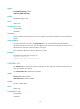
Syntax
fcoe global fcf-priority priority
undo fcoe global fcf-priority
Default
The default setting is 128.
Views
System view
Predefined user roles
network-admin
mdc-admin
Parameters
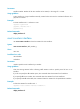
priority: Specifies the system FCF priority in the range of 0 to 255. The smaller the value, the higher the
priority.
Usage guidelines
The system FCF priority is used in the fcf priority field in an unsolicited Discovery Advertisement.
An ENode selects the FCF switch with the highest priority from the FCF switches sending Discovery
Advertisements and sends a FLOGI request to it for login.
This command is effective for all VFC interfaces in F mode.
Examples
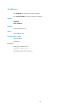
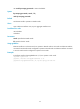
# Configure the system FCF priority as 12.
<Sysname> system-view
[Sysname] fcoe global fcf-priority 12
interface vfc
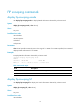
Use interface vfc to create a VFC interface and enter its view. If the VFC interface already exists, you
enter VFC interface view directly.
Use undo interface vfc to delete a VFC interface.
Syntax
interface vfc interface-number
undo interface vfc interface-number
Default
No VFC interface exists.
Views
System view
Predefined user roles
network-admin
mdc-admin