
R211x-HP Flexfabric 11900 FCoE Configuration Guide

19
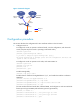
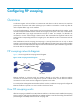
Figure 15 Network diagram
Configuration procedure
This section describes the configurations for VFC interfaces and FIP on the FCF switch.
1. Configure Switch A:
# Configure the switch to operate in advanced mode, save the configuration, and reboot the
switch. (Skip this step if the switch is operating in advanced mode.)
<SwitchA> system-view
[SwitchA] system-working-mode advance
Do you want to change the system working mode? [Y/N]:y
The system working mode is changed, please save the configuration and reboot the
system to make it effective.
# Configure the switch to operate in FCF mode, and create VSAN 10.
<SwitchA> system-view
[SwitchA] fcoe-mode fcf
[SwitchA] vsan 10
[SwitchA-vsan10] quit
# Enable LLDP globally.
[SwitchA] lldp global enable
# Enable LLDP on interface Ten-GigabitEthernet 1/0/1, and enable the interface to advertise
DCBX TLVs.
[SwitchA] interface ten-gigabitethernet 1/0/1
[SwitchA-Ten-GigabitEthernet1/0/1] lldp enable
[SwitchA-Ten-GigabitEthernet1/0/1] lldp tlv-enable dot1-tlv dcbx
[SwitchA-Ten-GigabitEthernet1/0/1] quit
# Create an Ethernet frame header ACL numbered 4000, and configure two rules to match FCoE
frames (protocol type 0x8906) and FIP frames (protocol type 0x8914).
[SwitchA] acl number 4000
[SwitchA-acl-ethernetframe-4000] rule permit type 8906 ffff
[SwitchA-acl-ethernetframe-4000] rule permit type 8914 ffff
[SwitchA-acl-ethernetframe-4000] quit
VFC1
XGE1/0/1
LAN SAN
Ethernet
switch
FCF switch
FCF switch
Server
Ethernet
FCoE
VFC2
VFC2
XGE1/0/2
XGE1/0/2
Switch A
Switch B