
R211x-HP Flexfabric 11900 FCoE Configuration Guide

26
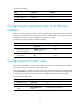
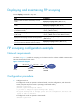
Displaying and maintaining FIP snooping
Execute display commands in any view.
Task Command
Display ENode information obtained by a Transit
switch.
display fip-snooping enode [ vlan vlan-id ]
Display FCF switch information obtained by a Transit
switch.
display fip-snooping fcf [ vlan vlan-id ]
Display the FIP snooping rules that have been flushed
(in standalone mode).
display fip-snooping rules [ enode | fcf ] [ vlan
vlan-id ] [ slot slot-number ]
Display the FIP snooping rules that have been flushed
(in IRF mode).
display fip-snooping rules [ enode | fcf ] [ vlan
vlan-id ] [ chassis chassis-number slot slot-number ]
Display the FIP snooping rules that are being flushed.
display fip-snooping flushing-rules [ enode | fcf ]
[ vlan vlan-id ]
Display information about FIP snooping sessions
(connections between ENodes and FCF switches).
display fip-snooping sessions [ vlan vlan-id ]
FIP snooping configuration example
Network requirements
As shown in Figure 17, enable FIP snooping on the Transit switch to achieve reliable communication
between the ENode and FCF switch.
Figure 17 Network diagram
Configuration procedure
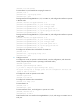
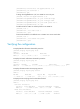
1. Configure Switch A:
# Configure the switch to operate in advanced mode, save the configuration, and reboot the
switch. (Skip this step if the switch is operating in advanced mode.)
<SwitchA> system-view
[SwitchA] system-working-mode advance
Do you want to change the system working mode? [Y/N]:y
The system working mode is changed, please save the configuration and reboot the
system to make it effective.
# Configure the switch to operate in Transit mode.
<SwitchA> system-view
Fabric
FCF mode
ENode mode
ENode
XGE1/0/2XGE1/0/1 XGE1/0/2
VFC2
Transit switch
Switch A
FCF switch
Switch B