
R211x-HP Flexfabric 11900 FCoE Configuration Guide

33
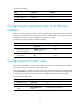
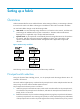
Ste
p
Command
Remarks
1. Enter system view.
system-view N/A
2. Enter VSAN view.
vsan vsan-id N/A
3. Enable the fabric
configuration
function.
domain configure enable
Enable or disable the function for all
switches in the VSAN as required.
By default, the fabric configuration function
is enabled.
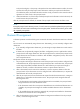
4. Disable the fabric
configuration
function.
undo domain configure enable
Setting a fabric name
The fabric name configured takes effect only on a statically-built fabric. You must configure the same
fabric name for all switches in a VSAN.
To set a fabric name:
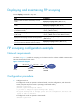
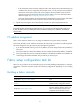
Ste
p
Command
Remarks
1. Enter system view.
system-view N/A
2. Enter VSAN view.
vsan vsan-id N/A
3. Configure a fabric
name.
fabric-name name
By default, the fabric name is null.
If the user does not configure a fabric name, the
switch WWN is used as the fabric name.
Setting the switch priority
The priority value for FCF switches is in the range of 1 to 254. The smaller the value, the higher the
priority. The FCF switch with the highest priority will be elected as the principal switch.
The priority is configured on a per-VSAN basis, and one FCF switch can have different priorities in
different VSANs.
In a stable fabric, the configured priority does not take effect immediately. Therefore, the running priority
of a switch might be different from the configured priority. To validate the configured priority, use the
domain restart disruptive command to perform a disruptive reconfiguration. After a disruptive
reconfiguration, the running priority still might be different from the configured priority, depending on the
configured priority value, as shown in Table 3.
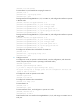
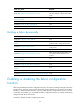
Table 3 Configured priority and run
ning priority mappings
Confi
g
ured
p
riorit
y
Runnin
g
p
riorit
y
≤ 2
• Principal switch—Same as the configured priority.
• Non-principal switch—3.
> 2
• Principal switch—2.
• Non-principal switch—Same as the configured priority.
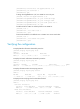
To set the switch priority: