
R211x-HP Flexfabric 11900 FCoE Configuration Guide

35
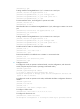
HP recommends that you configure domain IDs of the same type for all switches in a VSAN.
To configure a domain ID for a switch:
Ste
p
Command
Remarks
1. Enter system view.
system-view N/A
2. Enter VSAN view.
vsan vsan-id N/A
3. Configure a domain ID for
the switch.
domain-id domain-id { preferred |
static }
By default, the domain ID of a switch is
0 and is of the preferred type.
Configuring the mapping between the N_Port
WWN and an FC address
If you bind the WWN of an N_Port to an FC address, when the N_Port requests an FC address, the
switch assigns the bound FC address to it.
The WWN of an N_Port can be bound to only one FC address, and vice versa.
The N_Port here indicates an N_Port on a node or an NP_Port on an NPV switch.
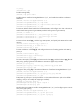
To bind the WWN of an N_Port to an FC address:
Ste
p
Command
Remarks
1. Enter system view.
system-view N/A
2. Enter VSAN view.
vsan vsan-id N/A
3. Bind the WWN of an
N_Port to an FC address.
wwn wwn-value area-port-id
area-port-id-value
By default, no binding is
configured.
If the N_Port has been assigned
another FC address or the FC
address has been assigned to
another N_Port, the binding is
not allowed.
Configuring the fabric timers
The fabric operation involves the following timers:
• Distributed service timeout period
• Error detection timeout period
• Resource allocation timeout period
For more information about these timers, see FC-related protocols and standards.
You can configure fabric timers in one of the following ways:
• Configure the timers in system view, and the configuration takes effect for all VSANs.
• Configure the timers in VSAN view, and the configuration takes effect for only the VSAN.