
R211x-HP Flexfabric 11900 FCoE Configuration Guide

68
Configuring the shortest SPF calculation interval
SPF calculations occur when the LSDB changes. To limit the amount of CPU resources consumed by
frequent SPF calculations, you can change the shortest SPF calculation interval.
The shortest SPF calculation interval defines the minimum interval between two consecutive SPF
calculations. A smaller value means that FSPF responds faster to fabric changes by recalculating routes
in a VSAN, but it requires more CPU resources.
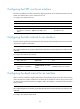
To configure the shortest SPF calculation interval:
Ste
p
Command
Remarks
1. Enter system view.
system-view N/A
2. Enter VSAN view.
vsan vsan-id N/A
3. Configure the shortest SPF
calculation interval.
fspf spf-hold-time value The default setting is 0 second.
Configuring the minimum LSR receiving interval
The minimum LSR receiving interval specifies the time between receiving LSRs in a VSAN. Any LSR
instances of the same LSR received within this time are dropped. This helps avoid frequent SPF
calculations caused by LSDB updating.
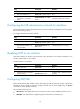
To configure the minimum LSR receiving interval:
Ste
p
Command
Remarks
1. Enter system view.
system-view N/A
2. Enter VSAN view.
vsan vsan-id N/A
3. Configure the minimum
LSR receiving interval.
fspf min-ls-arrival value The default setting is 1 second.
Configuring the minimum LSR refresh interval
The minimum LSR refresh interval specifies the interval at which LSRs are refreshed. To reduce SPF
calculations and LSR flooding in a fabric caused by frequent LSR refreshing, the switch cannot refresh
local LSRs within this interval.
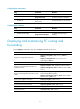
To configure the minimum LSR refresh interval:
Ste
p
Command
Remarks
1. Enter system view.
system-view N/A
2. Enter VSAN view.
vsan vsan-id N/A
3. Configure the minimum
LSR refresh interval.
fspf min-ls-interval value The default setting is 5 seconds.