
R211x-HP Flexfabric 11900 FCoE Configuration Guide

72
Static FC routing configuration example
Network requirements
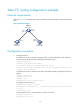
As shown in Figure 22, configure static routes to enable any two FCF switches to communicate with each
other.
Figure 22 Network diagram
Configuration procedure
1. Configure Switch A:
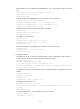
# Configure the switch to operate in advanced mode, save the configuration, and reboot the
switch. (Skip this step if the switch is operating in advanced mode.)
<SwitchA> system-view
[SwitchA] system-working-mode advance
Do you want to change the system working mode? [Y/N]:y
The system working mode is changed, please save the configuration and reboot the
system to make it effective.
# Configure the switch to operate in FCF mode, and enable the fabric configuration function in
VSAN 1.
<SwitchA> system-view
[SwitchA] fcoe-mode fcf
[SwitchA] vsan 1
[SwitchA-vsan1] domain configure enable
# Configure the domain ID as 1.
[SwitchA-vsan1] domain-id 1 static
Non-disruptive reconfiguration or isolating the switch may be performed. Continu
e? [Y/N]:y
[SwitchA-vsan1] quit
# Create interface VFC 1, and configure it to operate in E mode.
[SwitchA] interface vfc 1
[SwitchA-Vfc1] fc mode e
Switch B
Switch A
XGE1/0/1
Switch C
Domain ID: 1 Domain ID: 3
Domain ID: 2
VFC1
XGE1/0/1
VFC1
XGE1/0/2
VFC2
XGE1/0/2
VFC2